User management re-design
Client
NDA
Duration
6 weeks
Team
1 designer (me)
1 project manager
4 developers
1 architect
Tools
Figma
User management system in need of updates
Due to NDA, some details have been removed. The project was carried out for a SaaS company with a user management system used to manage roles and permissions across multiple applications.
The system required a technical framework upgrade and a visual update to align with the current design system. Since both the codebase and user interface needed improvements, the project also provided an opportunity to address usability issues.
Role, design approach and limitations
As the sole designer and researcher at this company, I supported multiple projects in parallel. With a tight timeline, I combined discovery and design instead of running them as separate phases, allowing research and concept development to progress in parallel.
The application is desktop-only, so the redesign focused exclusively on desktop workflows and interactions.
Impact
Research identified opportunities to simplify workflows and reduce common sources of user confusion. The redesign is expected to reduce customer support requests and improve efficiency in key administrative tasks.
The solution had not yet been released when this case study was written, so no post-launch metrics were available.

Design process
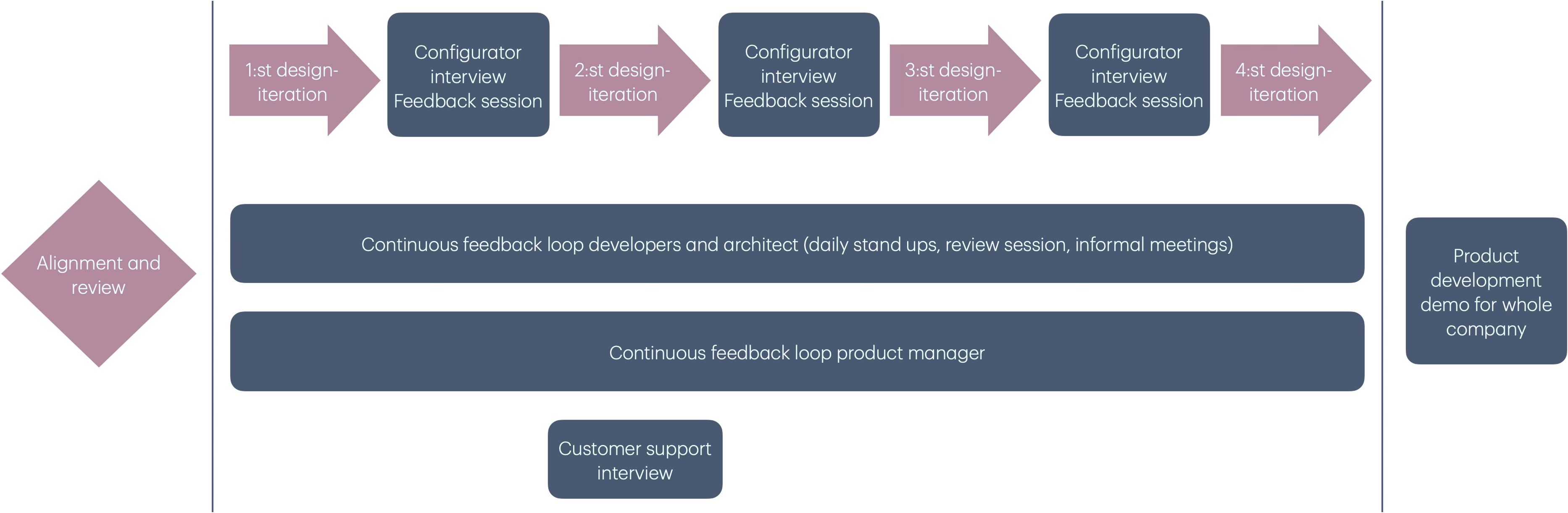
I started by aligning project goals with the project manager and clarifying technical constraints with developers to ensure feasibility within the existing architecture.
A UX review of the current system, combined with benchmarking similar tools, informed the initial concept by identifying key areas for improvement.
To validate early assumptions, I ran a series of individual sessions with configurators (the main user group), combining interviews and concept feedback. Between sessions, I iterated the design based on input, allowing the concept to evolve progressively.
In parallel, I spoke with the head of customer support to understand recurring user issues and ensure the direction addressed operational needs.
All input was incorporated into the concept and refined before being presented in a product development meeting, where additional stakeholder feedback informed final adjustments.
Main insights
Insights were gathered through configurator interviews and input from customer support, and were consistent with findings from the UX review and benchmarking phase, which helped validate early assumptions. Main insights:
-
User management generates a significant number of support tickets
-
Key workflows are time-consuming, especially when managing large numbers of users
-
Some content is unclear or outdated, leading configurators to rely on trial-and-error and workarounds
Main reasons for support cases: hidden users
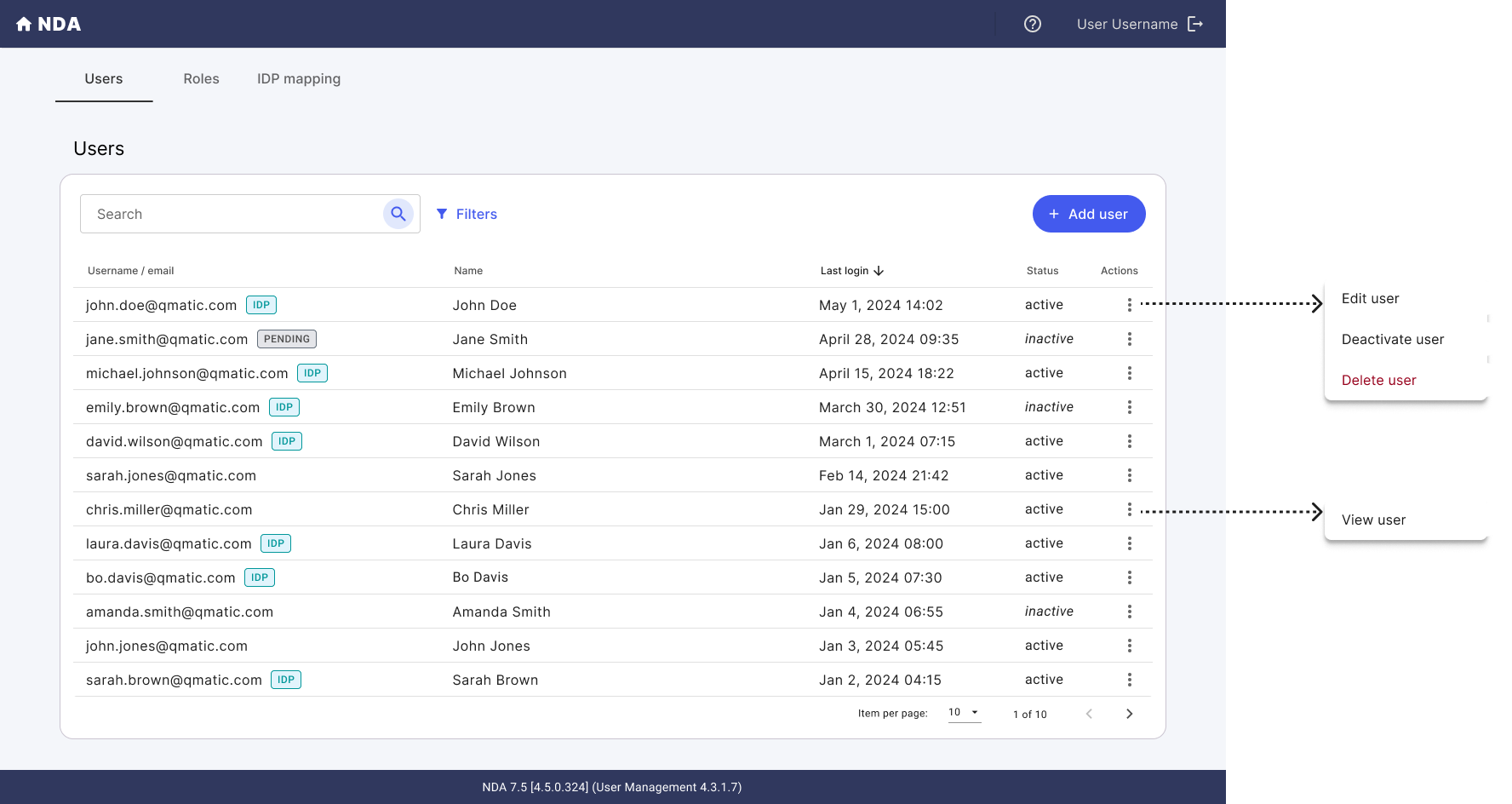
In the existing system, users only see accounts they have permission to edit. As a result, users often assume that other accounts do not exist, when they are simply hidden due to access rights. This has led to recurring support tickets.
Solution: Benchmarking showed that a common pattern in similar systems is to display all users in the list, regardless of permissions. The selected approach was to show all users while restricting actions such as edit, deactivate, or delete based on permissions. Both customer support and configurators confirmed that this would likely reduce confusion and related support cases.
Adding roles to users is time-consuming
For larger clients, assigning roles (which control access to applications) is a time-consuming task, especially when managing hundreds or thousands of users. The current flow requires users to be created or edited individually before roles are assigned manually.
Solution: The new design introduced batch assignment of roles to multiple users, making it easier to manage access at scale, particularly when setting up roles for existing user bases. This feature was especially well received by configurators.

Confusing or outdated content
The system contained a long list of default roles, some of which were outdated or linked to non-existing applications. In addition, some applications required multiple access modules without clear documentation on which modules were needed, making it difficult to assign correct access rights.
Solution: The roles and access module structure was simplified by removing outdated entries and cleaning up the list. Access setup was streamlined so that adding a module now includes all required components for a given application. Modules were also grouped to improve overview and reduce complexity.
"If everything we discussed is implemented, well, we'll be happy for the next 10 years again"
Results: improved usability and alignment with design system
The interface was updated to align with the current design system, improving consistency across applications and reducing visual and structural inconsistencies. Several usability issues and inefficient workflows were also addressed.
Expected impact:
-
Reduced support cases related to user management confusion
-
Decreased time required for key administrative tasks
-
Improved clarity of roles, permissions, and content structure
Next step: company-wide demo provided additional insights
Due to a tight deadline, I prioritized interviews with key user groups during the concept phase. To gather broader input, I presented the concept in a company-wide product development demo.
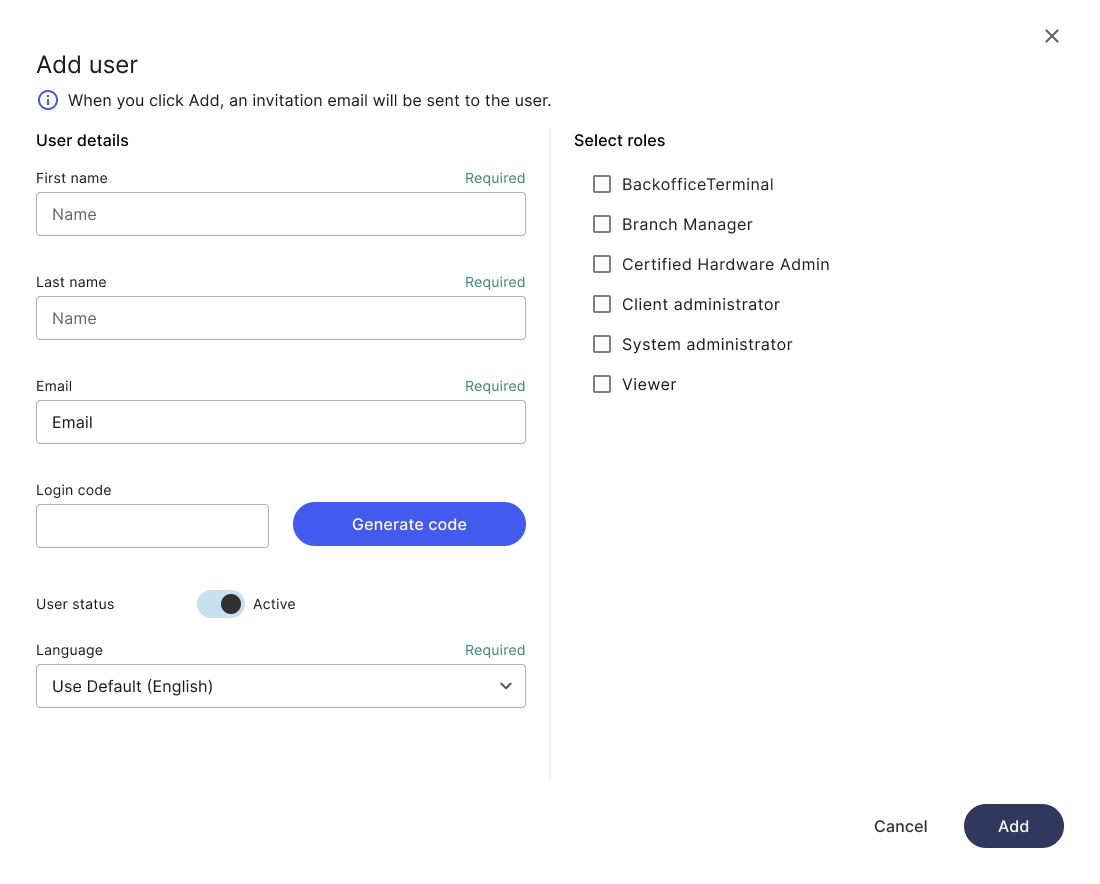
In collaboration with the project manager, a decision was made to replace password creation in the system with email-based password setup. This improves usability and security by removing the need for administrators to share passwords manually, and reduces support effort by enabling self-service password recovery.
However, feedback from the demo highlighted a limitation: some clients do not use employee email addresses, meaning alternative methods for account setup and authentication are still required.
While configurators are the primary user group, they are not the only users. In the next phase, we planned additional sessions with client administrators to better understand their needs and refine the solution.
Reflection
The insight that some clients do not have access to staff email addresses would ideally have been identified earlier in the discovery phase, before moving into concept design. In practice, this constraint emerged later due to tight deadlines and working as a solo designer across multiple parallel projects.
Given these conditions, I prioritized early concept development while continuing to validate and refine assumptions throughout the process. Despite the constraints, I am satisfied with the improvements delivered within the timeframe.
“Elin is one of the best UX specialists I’ve worked with. What impressed me most was her ability to really listen, understand the actual problem, and turn that into practical and user-friendly solutions.
I really enjoyed working with her on the user management project. Even with limited time & resources, she helped us create improvements that made tasks easier for users. I also learned a lot from her during our collaboration – especially how important listening and understanding user needs are for creating great results."